Simple tools for time, meetings, AI and everyday PC tasks

QdoShare builds lightweight, focused tools that get out of your way โ€” free online time and date utilities, a purpose-built countdown timer for meetings and presentations, a one-stop timeline of the AI model landscape, and a growing series of portable Windows utilities for everyday PC tasks. No bloat, no sign-ups, no friction. Just tools that respect your time.

Explore Free Tools Meeting Countdown Timer โ†’

Four Products, One Philosophy

Whether you need a quick online utility, a dedicated desktop timer for high-stakes meetings, a one-stop tracker for the fast-moving AI model landscape, or a tiny Windows utility that fixes a real everyday problem, QdoShare has you covered. All four share the same design principles: simple, fast, and respectful of your attention.

๐ŸŒ

Free Online Time & Date Tools

A growing collection of browser-based utilities for everyday time and date tasks โ€” countdown timers, stopwatches, world clocks, time zone converters, date calculators, and more. Free forever, no sign-up required.

Free ยท Browser-based ยท No installation
Explore Tools โ†’
โฑ

Meeting Presentation Countdown Timer

A floating, transparent Windows desktop timer built for meetings, pitches, and presentations. Always-on-top, never obscures your slides, and gives the whole room a shared sense of remaining time. $19.99 one-time.

$19.99 one-time ยท Windows desktop ยท Free trial
Learn More โ†’
๐Ÿง 

AI Models Timeline

A one-stop tracker for the launch dates and major update milestones of the top 50 AI models. No more hunting across dozens of company blogs โ€” see every important moment in one place and compare model progress side by side.

Free ยท Browser-based ยท Always up to date
View Timeline โ†’
๐Ÿ–ฅ๏ธ

PC Utility Software

A growing series of tiny, portable Windows utilities that fix everyday computer annoyances โ€” one-click access to built-in system commands and version info, detection of your exact Windows version and build, and guidance on which Windows you can upgrade (or downgrade) to under Microsoft's release and support policies. Two releases so far: QdoShare WinVerChecker and QdoShare WinUpgradeChecker.

Portable ยท Windows ยท No installation
Explore the Series โ†’
PRODUCT 1 ยท FREE

Free Online Time & Date Tools

Most online "free" tools are loaded with ads, pop-ups, and sign-up walls. QdoShare's tools are different: open a page, use the tool, get your answer, move on. Every tool runs entirely in your browser, loads in under a second, and never asks for your email.

We're rolling these out one at a time, carefully. The full collection covers four categories of everyday time and date needs.

  • Timers & Countdowns โ€” Online countdown timer, stopwatch, Pomodoro timer, alarm clock
  • Time & Time Zones โ€” World clock, time zone converter, meeting planner, duration calculator
  • Date Calculators โ€” Days between dates, date math, age calculator, day-of-week finder
  • Developer Utilities โ€” Unix timestamp converter, ISO 8601 formatter
See All Planned Tools โ†’
โณ
Countdown Timer
Coming Soon
โฑ
Stopwatch
Coming Soon
๐ŸŒ
World Clock
Coming Soon
๐Ÿ”„
Time Zone Converter
Coming Soon
๐Ÿ“…
Date Calculator
Coming Soon
๐Ÿ…
Pomodoro Timer
Coming Soon
PRODUCT 2 ยท $19.99 ONE-TIME

Meeting Presentation Countdown Timer

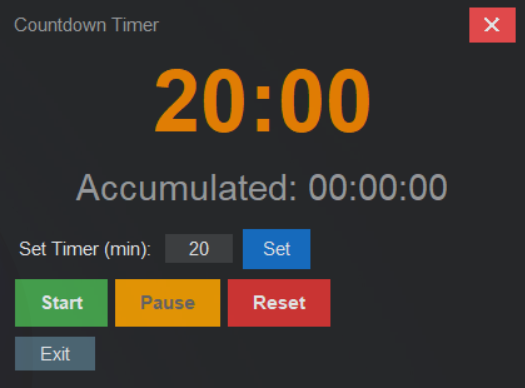
A Windows desktop timer built specifically for meetings, pitches, and presentations. It floats above your slides, stays transparent so it never obscures content, and gives everyone in the room a shared sense of how much time remains.

No installation, no account, no subscription. Just open the executable, type a duration, and start. The entire setup takes under 10 seconds โ€” and the timer quietly does its job for the rest of the meeting.

  • Always-on-top โ€” stays visible above PowerPoint, Zoom, Teams, and browser tabs
  • Transparent & compact โ€” never blocks your slides or demo screen
  • Large readable digits โ€” visible from across the conference room
  • Hover controls โ€” pause, resume, reset; auto-hide after 5 seconds
  • Fullscreen "TIME'S UP" โ€” a clear, dignified end signal, not a jarring alarm
  • Zero setup โ€” single .exe file, runs on any Windows PC
View Product Page โ†’ Buy Now โ€” $19.99
QdoShare Countdown Timer Interface
PRODUCT 3 ยท FREE

AI Models Timeline

The AI landscape moves fast โ€” a new flagship model lands every few weeks, and a "major update" can rewrite leaderboards overnight. Tracking the important moments across OpenAI, Anthropic, Google, Meta, Mistral, DeepSeek, and dozens of other labs is genuinely hard.

The QdoShare AI Models Timeline curates the first-release date and major update milestones for the top 50 most influential AI models in one place, so you can see the whole field at a glance, compare progress between labs, and spot patterns without tab-juggling.

  • Top 50 models covered โ€” frontier labs, open-source leaders, and Asian challengers
  • First-release date & major updates โ€” every meaningful version with a short note on what changed
  • Filter & search โ€” by lab, category, or release year; sort any column
  • One-click refresh โ€” re-sorts and re-renders to the latest known state
  • Statistics date stamped โ€” always see when the data was last compiled
  • Need more? โ€” contact us and we'll add the model you care about
Open the Timeline โ†’
Snapshot ยท Top 10 by Influence
GPT-5 ยท OpenAI
2025-08 ยท Unified reasoning model
Latest
Claude 4 Sonnet ยท Anthropic
2025-09 ยท 1M context window
Gemini 2.5 Pro ยท Google
2025-06 ยท Deep Think mode
Llama 4 70B ยท Meta
2025-04 ยท Native multimodality
DeepSeek-R2 ยท DeepSeek
2026-02 ยท 1T+ MoE, open weights
+ 45 more models โ†’
PRODUCT 4 ยท PC UTILITY SOFTWARE

Small Windows Utilities That Just Work

Most people don't need a complicated system tool โ€” they just need a quick answer: What Windows am I running? Is it activated? What are the full specs? The QdoShare PC Utility series answers those questions with tiny, portable tools that open Windows' own built-in dialogs for you โ€” no commands to remember, no installers.

The series now ships two portable tools. The first release, QdoShare WinVerChecker, opens the classic Windows version dialog (winver) with one click for your OS edition, version, and licensing info โ€” or the full System Information tool (msinfo32) for a detailed OS and hardware snapshot. The second release, QdoShare WinUpgradeChecker, goes one step further: it reads the exact Windows build you're running and reports which releases you can move to under Microsoft's release and support policies โ€” including the upgrade type and whether your files and apps are preserved. No commands, no installers, no guesswork.

  • QdoShare WinVerChecker โ€” first release: one click to your Windows version dialog or full system information
  • QdoShare WinUpgradeChecker โ€” second release: see the exact Windows releases your PC can upgrade to before you touch anything
  • Two upgrade dimensions โ€” release (e.g. Windows 10 22H2 โ†’ Windows 11 24H2) and edition (e.g. Home โ†’ Pro), reported separately
  • Portable & clean โ€” single-file executables, no installation, no background processes
  • Roadmap โ€” downgrade-path guidance based on Windows release and support policies
Meet WinVerChecker โ†’ Meet WinUpgradeChecker โ†’ Browse PC Utilities โ†’
Q
QdoShare WinVerChecker
PC Utility Software ยท First release
?
Windows version at a glance:
Windows 11 Pro
Version 24H2 ยท OS Build 26100.xxxx ยท Activated
๐ŸชŸ
Open SM โ€” version dialog
๐Ÿงฐ
Open DM โ€” system information
One click. Two tools. Zero friction.
Q
QdoShare WinUpgradeChecker
PC Utility Software ยท v1.0.0
?
Where this PC can go next:
Windows 10 22H2 โ†’ Windows 11 24H2
In-place upgrade ยท Files & apps kept ยท Edition paths reported separately
๐Ÿชœ
Open UpgradeChecker โ€” release & edition paths
Know where your PC can go โ€” before you upgrade.

The QdoShare Philosophy

Every tool we build follows the same three principles. They're simple, but most software doesn't follow them โ€” and that's exactly why QdoShare exists.

๐ŸŽฏ

Focused, Not Feature-Packed

Each tool does one thing well. No settings panels full of options you'll never touch. No "pro" features behind paywalls. Just the core function, executed cleanly.

โšก

Fast From the First Click

Tools should load instantly and start working the moment you arrive. No splash screens, no onboarding wizards, no "create an account to continue." Open, use, done.

๐Ÿค

Respectful of Attention

No ads popping up mid-task. No newsletters begging for your email. No dark patterns. We build tools that quietly help โ€” and then get out of your way.

Pick the Tool That Fits Your Day

Need a quick online utility? Try our free time and date tools. Presenting on Windows? Get the countdown timer built for meetings. Tracking the AI model landscape? Open the timeline. Fighting a Windows quirk? Try the new portable PC utilities. All four are ready when you are.

Try Free Tools AI Models Timeline โ†’ PC Utilities โ†’